


Have you ever wondered how or why there is such a disconnect sometimes, between the job adverts that you are advertising and the types of candidate that have applied? You want pedigree candidates, and all you get are muppets that apply!!
The starting point for any job advert (for the majority of companies is the job description that you have created. But does it REALLY reflect the type of person you are trying to recruit? Chances are it doesn't……….. does it? Who wrote the job description? Did you entrust a line manager with the task? Did you palm it off to one of your juniors?
Here is a really great tip to see if you are in the right space with your job description verses the skills you are seeking to attract. You use an online tool called Wordle. Wordle creates word clouds out of text - with the more common and prominent words being larger in size. So here are the 7 simple steps to recruit the candidate you really want using Wordle.
Step 1. Take 2 or 3 CV's of previous candidates that have been successful for previous similar roles (or CV's that you really rate for the position).
Step 2. Cut and past the text of the CV's into https://www.wordle.net/create
Step 3. Change the font (above the image) and colours to your choice, and you have a word cloud of all the keywords you are looking for in the person you want to hire. Do a screen print.
Here is an example of a Retail Manager CV:
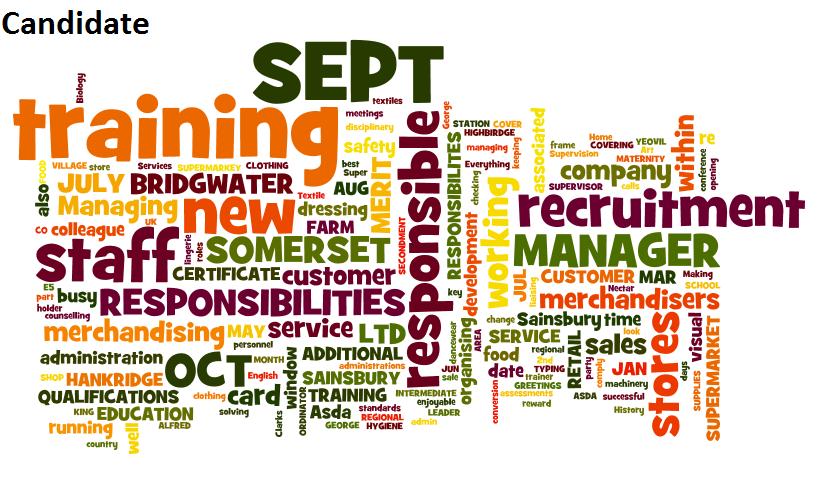
Step 4. Now do the same for the job description. Cut and past the text into a new screen - https://www.wordle.net/create - making sure to change the font and colours to the same as above for a direct comparison (just as I DIDN'T do here!).
Here is the Retail Manager Job Description:
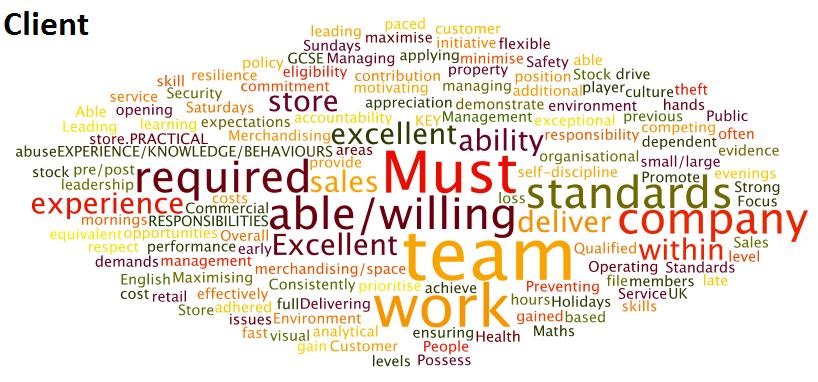
Step 5. Now compare the two! How far apart are they? (especially in the above example!) Worrying isn't it?
Step 6. Maybe check it with another couple of CV's, and then set about re-writing the job description to reflect the skills you are looking to recruit.
Step 7. Now, re-write the advert accordingly for posting online where-ever you choose.
The trick with this tip, is the more accurate CV's of target candidates you input, the better results you are going to have. In this example I just used one applicant.
This is a quick, neat trick to see how close you are to your candidate aspirations. Give it a try!
Thanks to Shally Steckerl for the inspiration for this tip.

If you like reading this blog, then click on the orange RSS icon here and get the latest Sirona Says posts delivered to your RSS reader or your inbox the moment they come out.

Comments 7 - Great tip to recruit the candidate
Comments 7 - Great tip to recruit the candidate
Stephen O'Donnell
I could fanny about with Wordle all day. It’s brilliant!
Good tip.
James_Mayes
You’re ability to fanny around isn’t in doubt Stephen
Seriously, nice catch Andy. Wordle’s an interesting little tool, hadn’t considered this perspective though. Inspired me to go play with a few concepts I’m shaping at the moment. Trying to match what I think is required to actual specifications - this kind of use might give me a nice sanity-check. Y’know, I don’t like to be forced to think creatively this early, you need to give more warning (or coffee)!
J.
Dan
Great tip, spent last night trying it out and am hooked! I think this is also a great way of brainstorming, I’ve used mindmapping to date but by getting everyone to write down some ideas and then using Wordle, you have a pretty clear view of the most popular ideas.
Trish McFarlane
What a great idea. I just shared it with our Talent Acquisition leader. Thanks for the great content as usual Andy.
CloudNineRec
Really like this idea Andy. Get’s my vote.
Mazhar Khan
It’s amazing how human brain can create such novelties. Great work!!!
Shirley
Thanks for another great post Andy and Wordle is addictive! Who knew that I would find social recruting so fascinating.